

What to change on the homepage first.
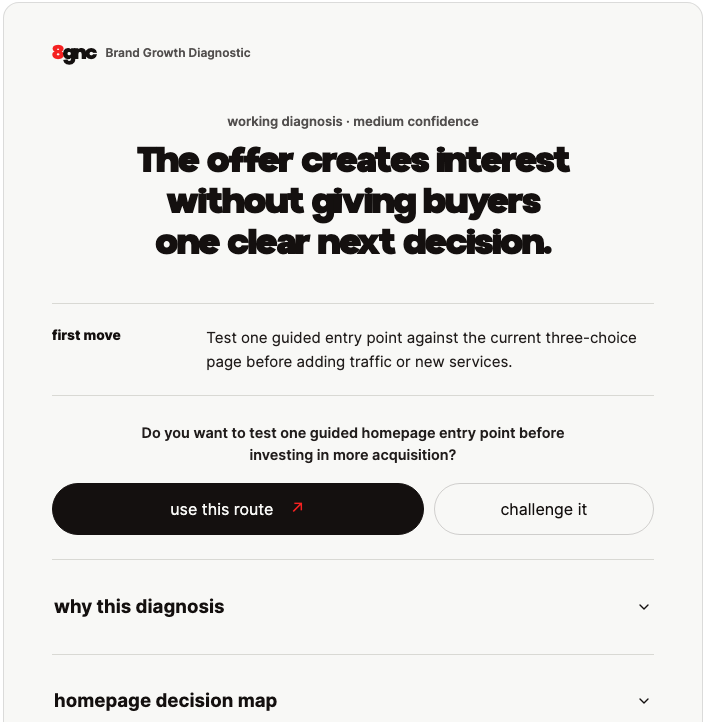
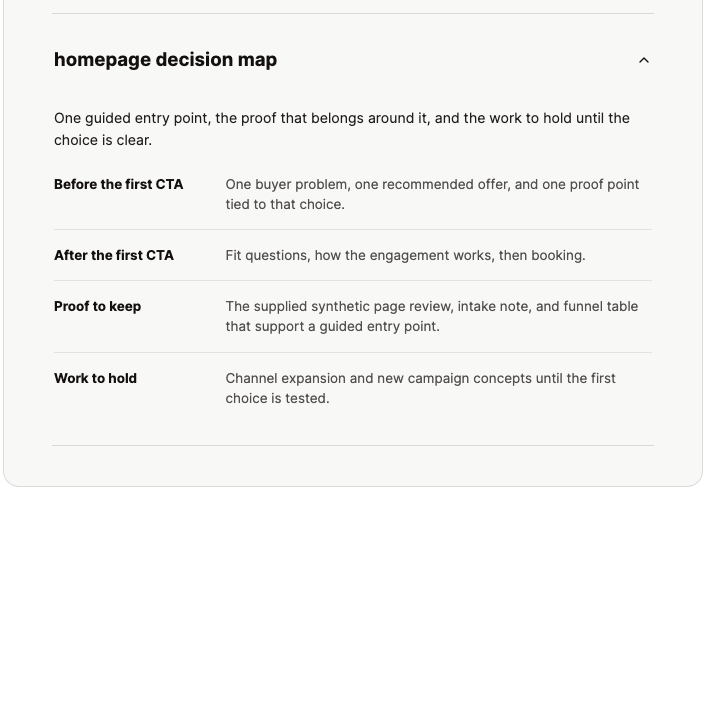
In this example, the recommendation is to test one clear starting point instead of three choices before adding more traffic. The homepage map sets out what belongs before the first button, what follows it, which evidence to keep, and which work should wait.
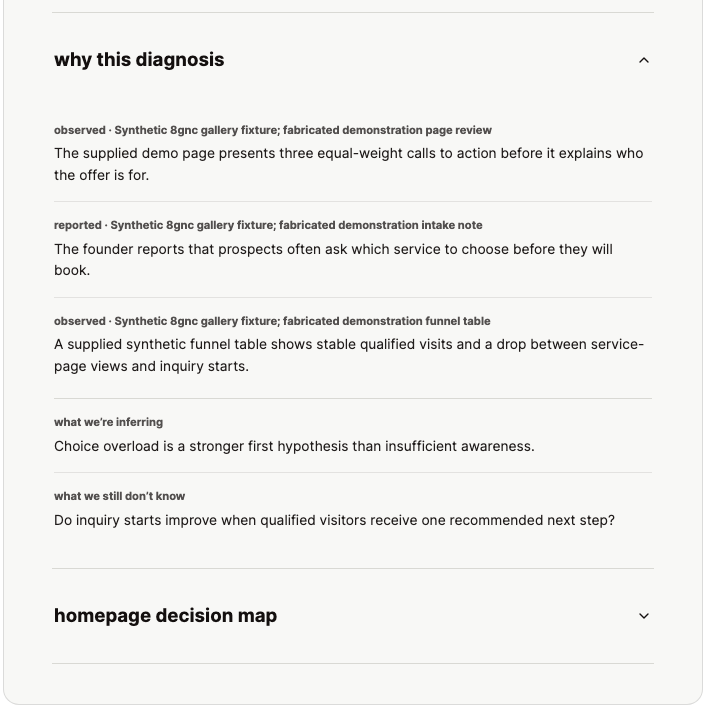
The example starts with a homepage that creates interest but leaves buyers unsure what to do next. Its evidence is demonstration data, not a client result.
Watch the recorded example →Shown here: the installed plugin’s interface in a compatible app. The ordinary chat starter does not install it or promise this layout or output.
Use the plugin in a supported app.
The 8gnc plugin adds a set of guided methods to a supported app. It needs installation. Check the app and setup steps before choosing it.
ChatGPT comes first. The current listing is v0.2.1; the v0.3 interface update is coming soon. Codex and Claude Code use the install commands below. Claude Code is not Claude in your browser. Your app may require an account or a paid plan; installing the MIT-licensed skills is free.
Install on ChatGPT
The directory listing is live.
Directory available
The current ChatGPT listing is available at v0.2.1. The v0.3 interface update is coming soon.
Open the current ChatGPT listing.
Add 8gnc in ChatGPT, then begin with the brand or growth decision you need to make.
View 8gnc in ChatGPT →9ee41089f138a456a50743d02094f315a2dd08a969bfb980fbaeb223a0da31c1Optional, after install
Get public-beta updates.
Installation never requires an email. Subscribe only if you want release notes and occasional requests for beta feedback.
Account and research requirements.
The renderer requires no 8gnc account, authentication, database, or private-system connection. Your host and any optional research service may have separate requirements.
- Optional host-side research ↗
- Some specialist methods can use a research service you configure in the host. The 8gnc renderer never calls DataForSEO or another external source and requires no paid account.
You still decide what to do.
The renderer presents the structured diagnosis supplied by the host. It does not create or verify the diagnosis, research, fetch, store, access private systems, or execute recommendations.
“Use this route” continues with the proposed method inside the host. “Challenge it” asks the host to pressure-test the diagnosis. Neither button executes an external action.
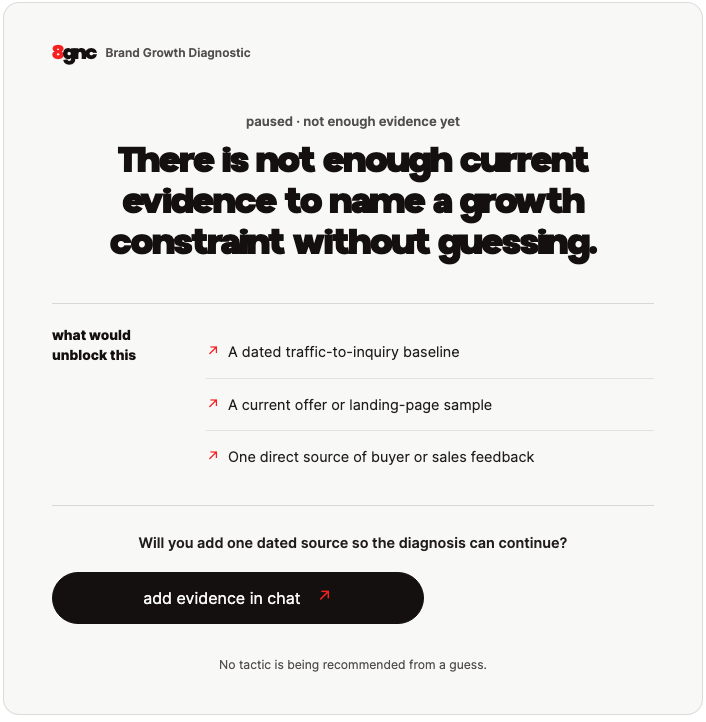
If the evidence is not there, 8gnc does not force a diagnosis. It stops, names what is missing, and asks for the source needed to continue.
Questions, answered.
- Can I start without installing anything?
- Yes. Choose a starting question on this page and open it in ordinary ChatGPT or Claude. Sign-in may be required. It starts a conversation, not a plugin installation, and does not promise the illustrated interface.
- What can I work through?
- Start with a brand, website, content, or marketing decision. Explain what is happening, what you have tried, and what evidence you have. Ask for a possible explanation, what supports it, and one thing to check next.
- When would I use the full plugin?
- Use the installed plugin when you want a repeatable set of guided methods in a supported app. Codex and Claude Code setup options are below. Claude Code is a separate app from Claude in your browser.
- Is there a charge?
- The starting question and MIT-licensed skill package are free. Your chosen app and optional research services may have their own account requirements and charges. Human services from 8gnc are separate.
- What does v0.3 add?
- The 37-skill method stays intact. Compatible ChatGPT and Codex hosts can show what may be getting in the way, what to try first, and the evidence behind the answer in one read-only interface. You decide whether to use the advice, challenge it, or open a supplied output. Claude Code remains skills-only.
- What data reaches the renderer?
- Only the structured fields the host submits for the Working Diagnosis: the problem summary, evidence statements and provenance, as-of dates, the primary constraint, cited inferences, unknowns, route, confidence, and human decision gate.
- Does the renderer verify that the diagnosis is true?
- No. It checks structure, dates, and internal evidence references. It does not browse a source, contact anyone, generate research, or certify a recommendation.
- Can 8gnc access our CRM, email, or private systems?
- The renderer cannot. It has no CRM, mailbox, approval system, client portal, database, or private-system connection. Host-side skills can use only the evidence and capabilities you deliberately provide to that host.
- Can it publish, send, purchase, deploy, or change anything?
- No. The renderer is read-only. An output or conversational approval is not authorization for an external action.
- Is an 8gnc account required?
- No. The renderer has no account connection or authentication. Your host application and any optional third-party research service may have separate account requirements.
- Do Codex and Claude Code remain supported?
- Yes. Codex supports the 37 skills plus the renderer connection. Claude Code installs the same 37 skills without the hosted renderer.
Want Michael's help?
Talk with Michael about what is happening and whether 8gnc can help.
Talk with Michael →